Introduction
Linktree Pro 1 Year is a premium subscription service designed for content creators, influencers, and businesses who need advanced control over their link-in-bio page. You can buy Linktree Pro 1 Year directly for fast and secure activation on your existing account. This upgrade unlocks powerful features like detailed analytics, enhanced customization, and third-party integrations. Rather than a separate account, this service provides a Linktree Pro yearly subscription directly on your existing profile. The activation process applies the Pro status to your specific username, ensuring seamless continuity for your audience.
What is Linktree Pro?
Linktree is a widely used tool that allows users to house all their important links in a single, easy-to-navigate landing page. The platform offers a free version with basic functionality, but Linktree Pro is the paid tier that unlocks the platform’s full potential.
While the free version is suitable for beginners just starting out, the Pro version is built for growth. It transforms a simple list of links into a marketing tool capable of capturing emails, embedding videos, and tracking visitor behavior with precision. When you buy Linktree Pro 1 year, you are essentially investing in a toolset that helps convert your social media traffic into actionable results.
What Does Linktree Pro Offer?
Upgrading to Pro significantly expands what you can do with your profile. The core value lies in data and design freedom.
Key features include:
- Advanced Analytics: View detailed data on clicks, views, and click-through rates (CTR) over different time periods. Understand where your traffic is coming from and which links perform best.
- Enhanced Customization: Remove the Linktree logo, use video backgrounds, access premium themes, and customize button styles and fonts to match your brand identity perfectly.
- Scheduling and Priority Links: Schedule links to go live at specific times and use “Leap Links” to redirect visitors directly to a destination, bypassing the Linktree profile entirely for urgent campaigns.
- Email and Phone Collection: Collect visitor contact information directly on your Linktree to build your newsletter or SMS list without them leaving the page.
- Integrations: Connect seamlessly with tools like Mailchimp, Google Sheets, Zapier, and Facebook Pixel for retargeting.
- Commerce Features: Collect tips, donations, or sell products directly through your link-in-bio.
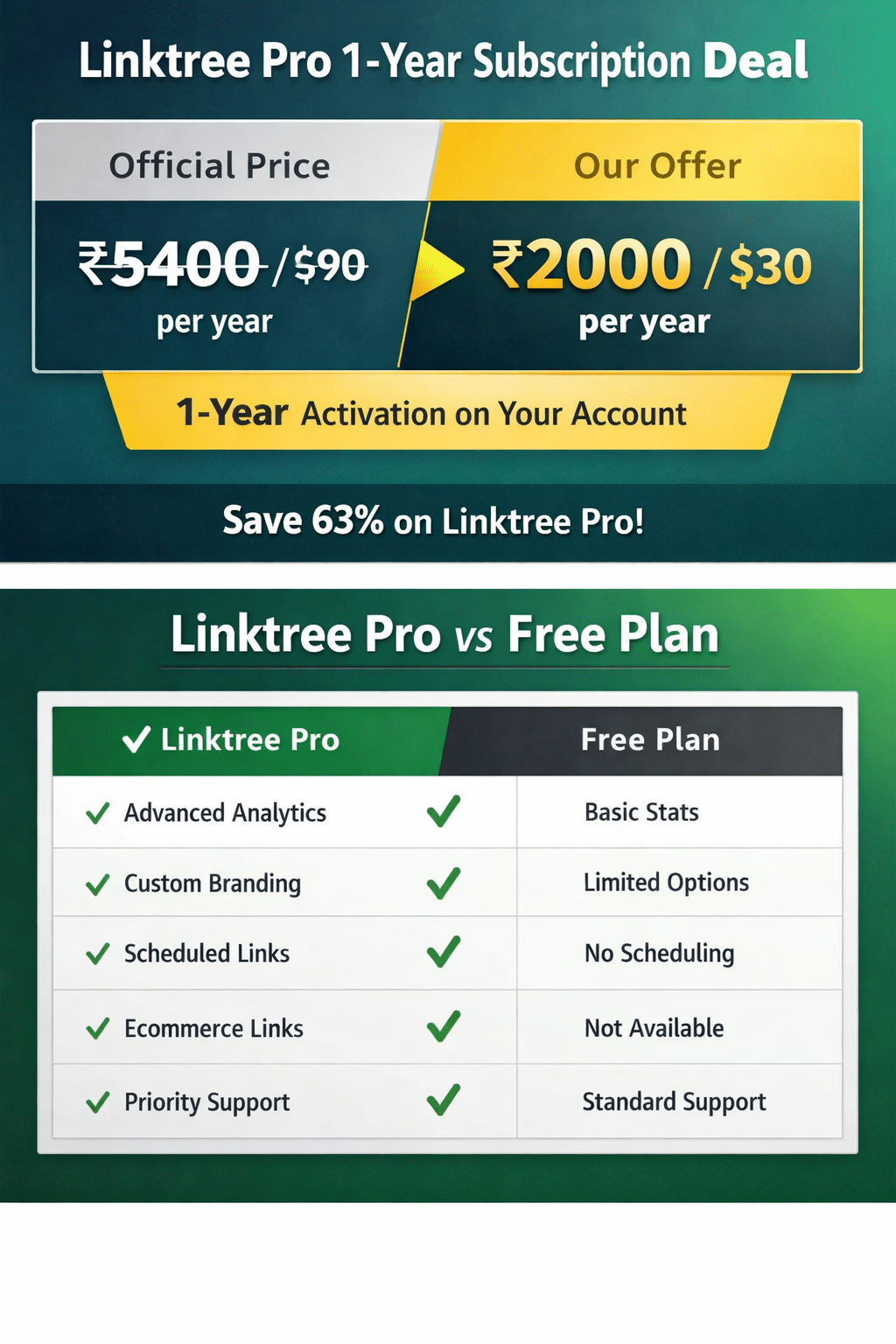
- Available for $30 (approx. ₹2000) per year.
- One-time payment for a full year of service.
By choosing the discounted activation, users save approximately 66% compared to the standard rate. This significant price reduction makes the Linktree Pro yearly subscription accessible to smaller creators and businesses operating on tighter budgets. The service delivers the exact same feature set as the full-priced version.
How Linktree Pro Activation Works
The process for a Linktree upgrade from free to pro through this service is distinct from the standard checkout flow. It focuses on applying a license to your specific user account.
Step-by-Step Activation:
- Purchase: You select the “buy Linktree Pro 1 year” package.
- Provide Details: During checkout, you provide your Linktree username (and sometimes temporary login credentials, depending on the specific provider’s method).
- Processing: The service provider processes the upgrade on the backend. This is often done through agency accounts or bulk licensing deals.
- Confirmation: Once the linktree pro activation on your account is complete, you receive a notification.
- Verification: You log in to your Linktree dashboard to verify that the “Pro” badge is active and premium features are unlocked.
This method is safe as it upgrades your existing account. You do not lose your current links, followers, or QR codes. Everything remains in place; the features simply expand.
Linktree Pro vs Free
The choice between Free and Pro depends on your goals.
- Analytics: Free users only see lifetime views and clicks. Pro users get day-by-day breakdowns, location data, and referrer information.
- Branding: Free accounts are limited to basic themes and must display the Linktree logo. Pro accounts offer complete visual control and logo removal.
- Link Controls: Free users can add standard links. Pro users can schedule links, highlight priority links, and use animated styling to draw attention.
- Marketing Tech: Only Pro users can integrate Facebook Pixel, Google Analytics, and email capture forms.
If you simply need to share a few URLs, the free version suffices. If you need to understand your audience and drive conversions, the upgrade is necessary.
| Feature | Linktree Pro | Beacons | Taplink | Carrd | Bio.fm | Milkshake |
|---|---|---|---|---|---|---|
| Primary Use | Link Aggregation | Monetization | Mini-Websites | One-Page Sites | Visual Content | Instagram Stories Style |
| Analytics | Advanced | Advanced | Moderate | Google Analytics | Basic | Basic |
| Customization | High | High | High | Very High | Moderate | Template Based |
| Integrations | Extensive | Extensive | Moderate | Moderate | Moderate | Limited |
| Ease of Use | Very Easy | Easy | Moderate | Moderate | Easy | Very Easy |
| Best For | General Purpose | Influencers | Businesses | Designers | Visual Artists | Lifestyle Bloggers |
Linktree Pro stands out for its balance of simplicity and powerful integration capabilities, making it the standard choice for most users.
Is Linktree Pro Worth It?
Determining value depends on your anticipated return on investment (ROI).
You should buy Linktree Pro if:
- You are a content creator: You need to know which content drives traffic so you can replicate success.
- You run a business: You need to capture leads (emails/phone numbers) and integrate with marketing tools like Facebook Pixel.
- You care about aesthetics: You want a page that looks professional, matches your brand colors, and removes the generic Linktree branding.
You may not need Pro if:
- You are a casual user: You only share links for fun with friends and family.
- You have zero budget: If you are not monetizing your audience yet, the free version is a perfectly capable starting point.
For those securing the discounted rate of $30/year, the barrier to entry is low enough that the advanced analytics alone often justify the cost.
How to Use Linktree Pro
Once your account is upgraded, you can immediately start optimizing your profile.
Beginner-Friendly Steps:
- Log in: Access your Linktree dashboard.
- Explore Analytics: Click on the ‘Analytics’ tab to see your traffic history.
- Customize Appearance: Go to the ‘Appearance’ tab. Upload your own background image or video. Change your button shapes and fonts.
- Set Up Integrations: Navigate to ‘Settings’ to connect your email provider (like Mailchimp) or add your Facebook Pixel ID.
- Schedule a Link: Add a new link. Click the calendar icon below the URL field to set a start and end time for that link to be visible.
- Highlight a Link: Use the “Priority Link” feature (often a star or animation icon) to make your most important link pop or shake to catch the user’s eye.
FAQs
What is Linktree Pro?
Linktree Pro is the paid subscription tier of Linktree that unlocks advanced features such as detailed analytics, custom branding, email collection, and third-party integrations like Facebook Pixel and Mailchimp.
How much is Linktree Pro?
The official price is approximately $6 to $9 per month (around $90/year) depending on your region and tax. However, through discounted activation services, you can buy Linktree Pro 1 year for as low as $30 (₹2000).
How to cancel Linktree Pro?
If you subscribed via the official Linktree website, you can cancel by going to the ‘Billing’ section in your account settings. If you purchased a 1-year activation via a third-party service, the subscription usually does not auto-renew, so manual cancellation is not required; the pro features will simply expire after 365 days.
Is Linktree Pro worth it?
Yes, if you need data to grow your audience or want a professional-looking profile without the Linktree logo. For businesses and serious creators, the analytics and integration features provide significant value.
Linktree Pro vs Free
The main difference is data and control. Free gives you unlimited links and basic stats. Pro gives you deep insights into who your audience is, where they come from, and allows you to customize every visual aspect of your page to match your brand.
How to get Linktree Pro for free?
Linktree occasionally offers free trials (usually 7 to 14 days) for new users to test Pro features. Non-profits and charities may also be eligible for free upgrades by applying directly through Linktree’s “Linktree for Good” program. Avoid “cracked” versions as they do not work for web-based services and compromise account security.